When people want to start a website for free, they often see two types of options: free website builders and free web hosting.
At first, they may sound almost the same.
Both can help you put a website online. Both may offer a free plan. Both can be useful for beginners, students, creators, small businesses, and people testing ideas.
But they are not the same thing.
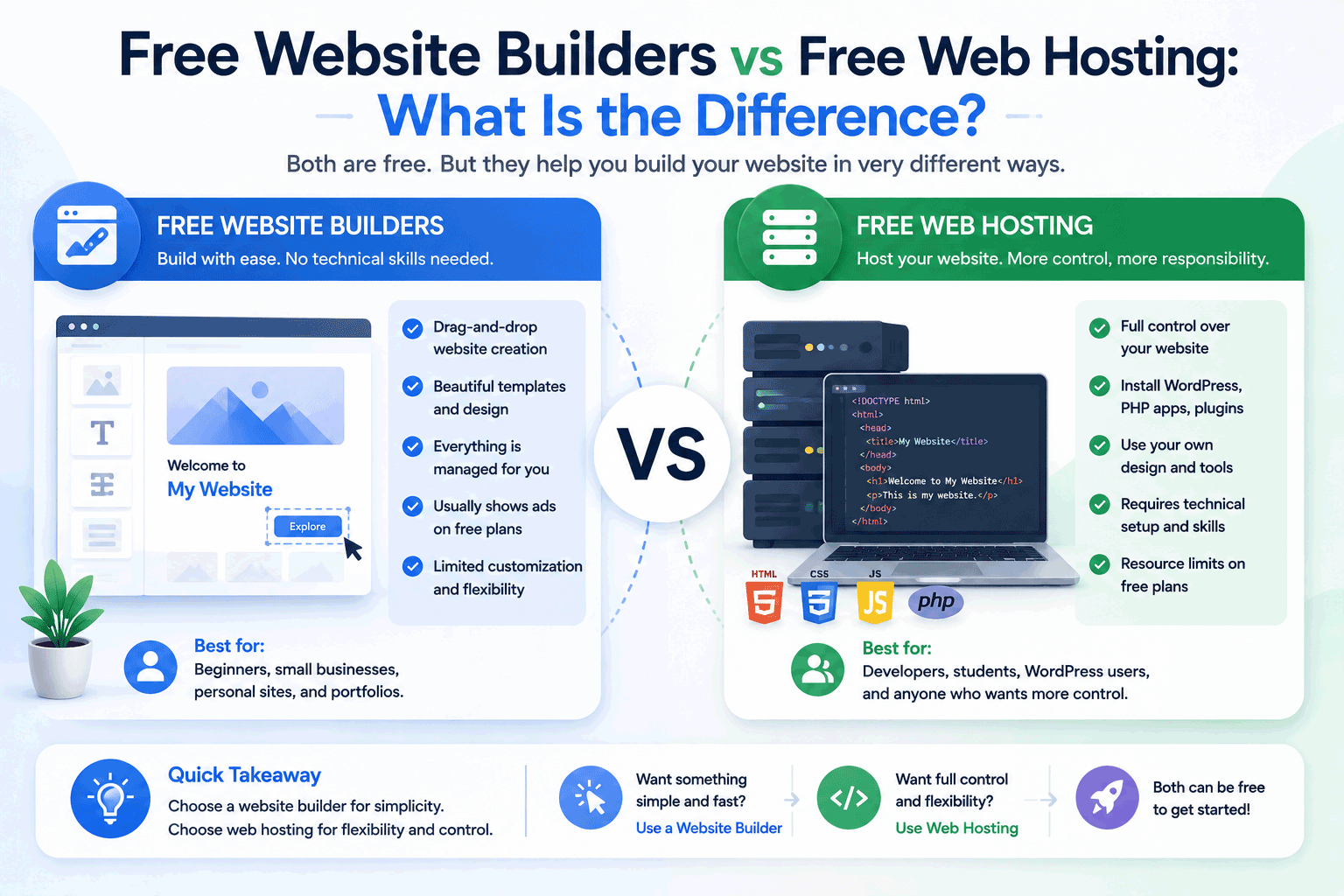
A free website builder usually gives you an easier way to create a website without touching much technical setup. Free web hosting usually gives you a place to host your website files, but you may need to build or manage more things by yourself.
The difference matters because choosing the wrong one can make your website journey harder than it needs to be.
If you want the easiest way to create a simple page, a website builder may feel better. If you want more control over files, code, WordPress, databases, or deployment, web hosting may be more suitable.
So before choosing, it is worth understanding what each option actually means.
What is a free website builder?
A free website builder is a platform that helps you create a website using built-in tools.
Usually, you do not need to manage hosting separately. You sign up, choose a template or layout, edit sections, add text and images, and publish the site from the same platform.
Many website builders include drag-and-drop editing, ready-made designs, page sections, forms, galleries, buttons, mobile-friendly layouts, and basic settings.
The main idea is convenience.
A website builder tries to make website creation easier for people who do not want to write code, upload files manually, configure databases, or manage server settings.
For beginners, this can be very helpful.
Instead of learning many technical steps first, you can focus on your website message, design, pages, and content.
What is free web hosting?
Free web hosting is a service that gives you server space to publish your website online without paying for hosting first.
Depending on the provider, it may support simple HTML files, PHP, MySQL, WordPress, custom domains, SSL, file uploads, FTP, control panels, or other hosting features.
With web hosting, you often have more responsibility.
You may need to upload website files, install WordPress, manage databases, connect domains, adjust settings, or understand more technical details.
This can feel less simple than using a website builder, but it can also give you more flexibility.
Free web hosting is often useful for people who want to learn how websites work, test PHP/MySQL, install WordPress, upload custom files, or manage a site with more technical control.
The simple difference
The easiest way to understand the difference is this:
A website builder helps you build the website.
A web hosting service gives your website a place to live online.
In real life, the line can overlap. Many website builders include hosting automatically. Some hosting providers also include website builder tools.
But the main focus is different.
A website builder focuses on ease of creation.
Web hosting focuses on giving you the hosting environment.
That difference affects how much control you have, how easy the setup is, how much you can customize, and how easily you can move your website later.
Website builders are usually easier for beginners
If you are completely new to websites, a website builder may feel more comfortable.
You can choose a template, edit text, upload images, add pages, and publish without needing to understand FTP, databases, file managers, DNS records, or server settings.
This is useful if your goal is to create something quickly.
For example, a website builder may be a good fit for:
- a simple personal website
- a small business draft
- a landing page
- an event page
- a basic portfolio
- a club or community page
- a temporary project page
The biggest advantage is speed. You can often build a basic website much faster than setting up traditional hosting from zero.
For non-technical users, that simplicity can be more valuable than having full control.
Web hosting gives more control
Free web hosting usually gives you more control over the website environment.
You may be able to upload your own files, install WordPress, create databases, use PHP scripts, manage folders, edit configuration files, or connect your own tools.
This is useful if you want to learn web development or build something more customized.
For example, free web hosting may be a better fit for:
- HTML/CSS/JavaScript learning
- PHP and MySQL practice
- WordPress testing
- student web development projects
- custom-coded websites
- small experimental applications
- projects that need file-level access
The trade-off is that you may need more technical understanding.
A website builder gives you an easier path. Web hosting gives you more room to manage things yourself.
Design flexibility can be different
Website builders usually provide templates and visual editing tools.
This is good because you can create a decent-looking website quickly. You do not need to design everything from a blank page.
But the design freedom depends on the platform. Some builders allow flexible layout editing. Others may limit what you can change unless you upgrade.
Web hosting works differently. If you can edit the code or install your own system, you may have more freedom. You can build your own design, use WordPress themes, upload custom templates, or create a fully custom site.
However, more freedom also means more work.
If you want fast design with less effort, a website builder may be better.
If you want deeper customization, web hosting may be better.
Content ownership and migration matter
One of the most important differences is what happens when you want to move your website later.
With web hosting, especially if you manage your own files or WordPress installation, migration may be more straightforward. You may be able to download files, export the database, and move the site to another provider.
With website builders, migration can be more limited.
Some builders make it easy to create a site, but not easy to export the full design, structure, or content into another platform. You may be able to copy text and images, but rebuilding the layout elsewhere could take time.
This does not mean website builders are bad. They are convenient because they keep everything inside one platform.
But that convenience can also create platform dependency.
Before choosing a website builder, check whether you can export your content or move your site later. This matters more if your website may become long-term or business-related.
Custom domain support may require upgrading
Both free website builders and free web hosting may give you a free subdomain at the beginning.
For example, your website address may look like:
yourname.provider.com
This can be acceptable for testing, learning, or temporary pages.
But if you want a more professional website, you may want your own domain, such as:
yourname.comyourbusiness.com
Custom domain support is often limited on free plans, especially with website builders. Many platforms require a paid plan before you can connect your own domain.
Some free web hosting providers may allow custom domains on free plans, but the details vary.
If a custom domain matters to your project, check this before choosing either option.
A free plan may help you start, but a custom domain often becomes important when your website becomes public or professional.
Ads and branding can affect trust
Free website builders often show platform branding on free websites. Some may also show ads.
Free web hosting providers may also show ads, although some do not.
For a personal test site, this may not matter. For a business website, portfolio, or professional page, it can matter a lot.
Visitors may see platform branding or ads and feel the website is less serious. They may not know it comes from the free plan. They may simply judge the site based on what appears on the page.
Before choosing a free option, check whether your website will show:
- banner ads
- popups
- footer branding
- provider badges
- promotional messages
- forced links
A free plan can still be useful, but you should know how it will look to visitors.
WordPress support is not the same
This is a common point of confusion.
A website builder is not the same as WordPress hosting.
Some website builders have their own editing system, templates, and content tools. You build inside their platform.
WordPress hosting, on the other hand, is designed to run WordPress. It needs PHP, a database, storage, and server resources.
If your goal is to learn WordPress, a general website builder may not help. You need either a hosted WordPress platform or web hosting that supports WordPress installation.
If your goal is simply to create a website without learning WordPress, a website builder may be easier.
So before choosing, ask yourself:
Do I want to learn WordPress specifically, or do I just want an easy website?
That answer will guide your choice.
Website builders can be faster to launch
For quick publishing, website builders usually win.
You can often create a simple website in a short time by choosing a template and editing the content.
This is useful for:
- quick landing pages
- small business drafts
- event pages
- personal profiles
- basic portfolios
- simple announcements
If your main goal is speed and simplicity, a website builder may save time.
But fast launch does not always mean long-term flexibility.
A website built quickly inside a builder may later feel limited if you need advanced features, more control, better SEO settings, custom code, or migration options.
Website builders are great when the platform’s tools match your needs. They become limiting when you outgrow those tools.
Web hosting is better for learning how websites work
If your goal is to understand websites deeply, web hosting can be more educational.
You may learn how files are uploaded, how folders are structured, how databases connect, how domains point to hosting, how SSL works, and how different technologies interact.
This is valuable for students, developers, and anyone who wants more technical confidence.
A website builder can help you create a website, but it hides much of the technical process.
That is good for convenience, but less useful if your goal is to learn the foundation of web hosting.
If you want to build knowledge, free web hosting can be a stronger learning tool.
Website builders are not only for beginners
Although website builders are beginner-friendly, they are not only for beginners.
Some designers, freelancers, marketers, and small business owners use website builders because they are efficient. They can create good-looking pages quickly without managing servers.
Modern website builders can also include advanced design options, animations, CMS-like features, e-commerce tools, and integrations.
However, the free plans are often limited. The full power of a builder may only be available on paid plans.
So for free use, a website builder may be best for simple sites and early drafts. For serious use, upgrading may be needed.
Web hosting is not always harder
Traditional web hosting may sound technical, but not every hosting platform is difficult.
Some hosting providers offer easy installers, file managers, control panels, templates, and one-click WordPress setup. For users who are willing to learn, free web hosting can be manageable.
The challenge is that web hosting usually gives you more choices. More choices can mean more confusion.
A beginner may need to understand terms like:
- hosting account
- domain
- DNS
- SSL
- FTP
- file manager
- PHP
- database
- bandwidth
- storage
- control panel
These are not impossible to learn, but they take time.
If you want a quick website with less technical learning, a builder may feel easier. If you want to understand and control the website environment, hosting may be worth learning.
Which one is better for small business websites?
For small business websites, the better choice depends on the business need.
A website builder can be good if the business wants a simple site quickly. It can help create service pages, contact sections, galleries, location details, and basic branding without technical setup.
However, the business should check ads, branding, custom domain support, form reliability, SEO settings, and upgrade pricing.
Free web hosting may be better if the business wants WordPress, custom files, more control, or a path toward a more flexible website. But it may require more setup and maintenance.
For a real public business website, a free plan may not always be the best long-term choice. A low-cost paid plan may offer better trust, domain support, speed, and support.
Free options can still be useful for drafts and early testing.
Which one is better for students?
Students can use both, depending on what they are learning.
If the assignment is about design, content, or creating a simple online page, a website builder may be enough.
If the assignment is about coding, HTML, CSS, JavaScript, PHP, databases, or web development, free web hosting is usually more useful.
For front-end projects, static hosting may be the best option.
For WordPress practice, students need a WordPress-capable platform.
For PHP/MySQL assignments, students need hosting that supports those technologies.
The best choice depends on the course requirement and learning goal.
Which one is better for portfolios?
Both can work for portfolios.
A website builder can help create a portfolio quickly with a clean design. This is useful for designers, writers, photographers, freelancers, and students who want a simple visual presentation.
Free web hosting or static hosting can be better for people who want more control, faster loading, custom code, or a developer-focused portfolio.
The main things to check are:
- does the portfolio look professional?
- are there forced ads or branding?
- can you use a custom domain?
- does it load quickly?
- is it easy to update?
- can you move it later?
For a portfolio, presentation and trust matter more than the label of the platform.
Which one is better for developers?
Developers usually benefit more from web hosting or developer-focused static hosting.
They may want Git deployment, custom code, environment settings, APIs, serverless functions, databases, or framework support.
A website builder may feel too limited for developers who want to control the structure and code.
However, developers may still use website builders for quick landing pages, client drafts, or non-technical projects.
For learning and technical growth, web hosting gives more direct experience.
SEO considerations
Both website builders and web hosting can support SEO, but the level of control differs.
Website builders may include basic SEO settings such as page titles, descriptions, URLs, image alt text, and mobile-friendly templates. This is enough for many simple websites.
Web hosting gives more flexibility because you can choose your own CMS, edit code, optimize performance, manage technical SEO settings, and use different tools.
However, SEO success is not only about hosting type. Content quality, site structure, speed, mobile usability, internal links, and user experience all matter.
For beginners, the most important thing is choosing a platform that allows clean pages, readable URLs, fast loading, mobile-friendly design, and easy content updates.
Cost after the free plan
The free plan is only the beginning.
Before choosing either a website builder or web hosting provider, check what happens when you need to upgrade.
With website builders, paid plans may unlock custom domains, remove branding, increase storage, enable e-commerce, improve forms, or provide more design features.
With web hosting, paid plans may offer more storage, bandwidth, databases, email, support, backups, and performance.
The upgrade path matters because many websites start small and grow later.
A free plan may be useful today, but you should know whether the paid plan still makes sense tomorrow.
Do not choose only based on the free offer. Look at the next step too.
Simple comparison table
| Area | Free Website Builder | Free Web Hosting |
|---|---|---|
| Main purpose | Build a website easily | Host website files or applications |
| Beginner difficulty | Usually easier | Can be more technical |
| Design method | Templates and visual editor | Code, CMS, file upload, or installer |
| Hosting included | Usually yes | Yes, but setup may be manual |
| Control | More limited | Usually more flexible |
| WordPress support | Usually not the same as WordPress hosting | Possible if PHP/MySQL supported |
| Custom code | Often limited | Usually more possible |
| Migration | Can be limited | Often easier if files/database are accessible |
| Custom domain | Often paid only | Depends on provider |
| Ads/branding | Common on free plans | Depends on provider |
| Best for | Simple sites, quick pages, non-technical users | Learning, WordPress testing, custom sites, developers |
This table is not about which one is better overall. It is about which one fits your purpose better.
When to choose a free website builder
A free website builder may be the better choice if:
- you want the easiest way to create a website
- you do not want to manage technical settings
- you prefer templates and visual editing
- you need a quick landing page or simple site
- your website does not require custom backend features
- you are comfortable staying inside one platform
- you are testing an idea before upgrading later
Website builders are good when convenience matters more than control.
When to choose free web hosting
Free web hosting may be the better choice if:
- you want to upload your own website files
- you are learning HTML, CSS, JavaScript, PHP, or MySQL
- you want to test WordPress
- you need file-level or database access
- you want more technical control
- you are building a custom-coded website
- you want to understand how hosting works
- you may need easier migration later
Web hosting is good when control and learning matter more than convenience.
A practical way to decide
Before choosing, ask yourself what kind of user you are.
If you are a beginner who wants a simple website quickly, start with a website builder.
If you are a student learning web development, use hosting that matches your course requirements.
If you are a developer, use static hosting or web hosting that supports your workflow.
If you are building a WordPress site, choose WordPress-capable hosting or a hosted WordPress platform.
If you are building a business website, think carefully about trust, domain, branding, speed, and support before relying on a free plan.
The right answer depends on what you are trying to achieve.
Do not choose based only on what is free
The biggest mistake is choosing a platform only because it costs nothing.
A free website builder may save time but limit migration.
Free web hosting may give control but require more learning.
A free subdomain may be fine for testing but less professional for business.
A free plan may work today but become too limited later.
Free is useful when it matches your stage and purpose.
It becomes a problem when it hides limits you did not expect.
How FreeHostsFinder wants to help
At FreeHostsFinder, we want to help readers understand these choices more clearly.
Many people searching for free hosting are not actually looking for the same thing. Some want a website builder. Some want WordPress. Some want static hosting. Some want a developer platform. Some want traditional hosting with PHP and MySQL.
That is why we do not see free hosting as one single category.
Our goal is to help users compare different options based on real needs, not just marketing words.
A good choice should help you start, but also give you a reasonable next step when your website grows.
Final thoughts
Free website builders and free web hosting can both help you publish a website, but they serve different needs.
A website builder is usually better when you want speed, simplicity, templates, and less technical work.
Free web hosting is usually better when you want more control, coding practice, WordPress testing, file access, databases, or a deeper understanding of how websites work.
Neither option is perfect for everyone.
The best choice depends on your website goal, skill level, future plans, and how much control you need.
Before choosing, think about what you are building and what may happen later. Will you need a custom domain? Will you want to move the site? Will you need WordPress? Will ads or branding matter? Will the website represent a business or only a test project?
When you understand those points, the choice becomes much easier.
Free tools can be a great way to start. The key is choosing the one that fits your real website journey.
Leave a Reply
You must be logged in to post a comment.