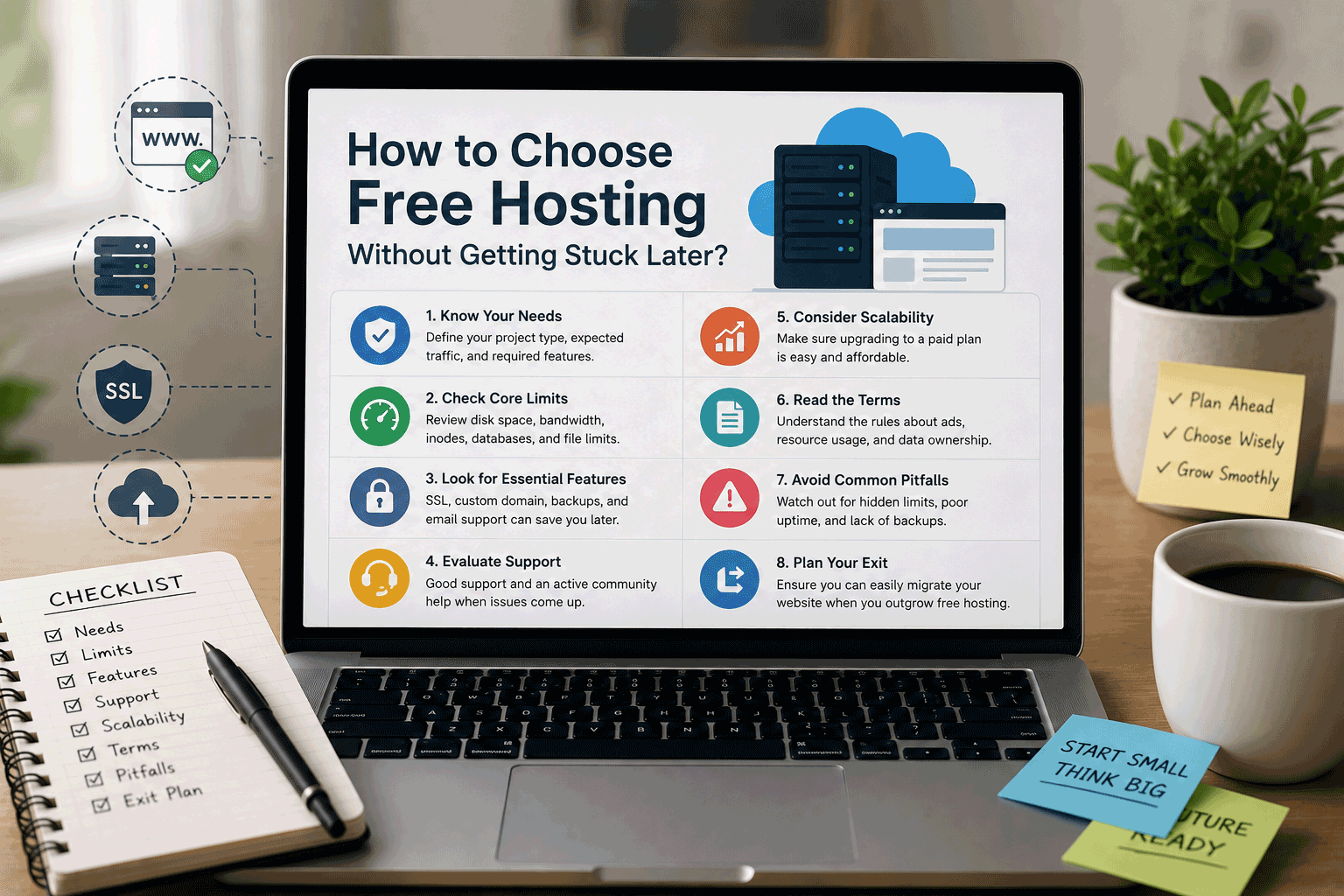
Free hosting can be a very helpful way to start a website.
It gives you a place to test an idea, learn how websites work, publish a small project, create a portfolio, try WordPress, or build a simple page without paying first. For beginners, students, creators, and small project owners, this can be a practical starting point.
But there is one thing many people do not think about early enough:
What happens if you want to move later?
A free hosting plan may look good when you first sign up. It may let you publish quickly and start building without cost. But if your website grows, if your needs change, or if you decide to upgrade, the platform you choose today can either make your next step easy or make it frustrating.
This is why choosing free hosting is not only about starting.
It is also about avoiding a situation where your website becomes difficult to move, upgrade, or manage later.
Free hosting should help you start, not trap your future
The best free hosting service is not always the one with the most attractive promise.
It is the one that helps you start while still giving you a reasonable path forward.
At the beginning, your website may be small. You may not care about custom domains, backups, migration, databases, ads, or upgrade pricing yet. You may only want to get something online.
That is understandable.
But after spending time building pages, uploading images, writing content, designing layouts, and sharing the link, the website becomes more valuable. Even if you did not pay for hosting, you invested your time and effort.
If you later discover that you cannot export your content, cannot move your files, cannot connect a domain, cannot remove ads, or cannot upgrade affordably, the free plan may become a problem.
Free hosting should be a beginning, not a dead end.
Why people get stuck with free hosting
People usually get stuck because they choose based only on the first-day experience.
They see that the platform is free. They create an account. They publish a page. Everything feels fine at first.
The problem appears later.
Maybe the website becomes slower after adding more content. Maybe the free plan does not allow a custom domain. Maybe ads appear on the website. Maybe the platform does not provide backups. Maybe exporting the site is difficult. Maybe the paid upgrade is more expensive than expected. Maybe the website builder does not allow full migration.
By that time, moving may feel inconvenient.
This is especially common with beginners because they do not yet know which questions to ask before choosing a host.
The goal is not to avoid free hosting. The goal is to choose free hosting with enough awareness that you can move forward when needed.
Start by knowing what kind of website you are building
Before choosing any free hosting platform, be clear about your website type.
A simple static website does not need the same hosting as a WordPress blog. A personal portfolio does not need the same setup as a PHP and MySQL project. A temporary landing page does not need the same foundation as a business website.
This matters because migration and future flexibility depend heavily on the platform type.
For example, a static website made with HTML, CSS, and JavaScript is often easier to move because it is mostly a collection of files. A self-hosted WordPress site may be movable if you can access the files and database. A website builder may be easier to use at the beginning, but harder to export later if the platform does not provide full migration options.
So the first question should not be “Which free host is popular?”
The better question is:
“What am I building, and how easy will it be to move this website later?”
Check whether you can export your content
Content export is one of the most important things to check.
If you write blog posts, create pages, upload images, or build a portfolio, you should know whether you can take that content with you if you leave the platform.
Some platforms allow easy export. Some allow partial export. Some make it difficult. Some website builders let you copy text and images manually, but not export the full design or structure.
This may not matter for a one-page test project. But it matters if you are building something long-term.
Before you spend many hours creating content, check whether the provider allows you to export:
- pages
- blog posts
- images
- media files
- website files
- database content
- theme or layout data
- settings where applicable
You do not need to move immediately. You only need to know that moving is possible.
A free platform is much safer to use when your content is not locked inside it.
Check file and database access
If your website uses normal website files, file access matters.
For a static website, you may want to download your HTML, CSS, JavaScript, images, and other assets.
For a WordPress site, you may need both website files and database access. WordPress content is usually stored in a database, while themes, plugins, and media files are stored separately. If you can only access one part, migration may be incomplete.
For PHP or database projects, access to the database is also important. You may need to export tables, download code, and move everything to another hosting provider later.
Some free hosting plans give access through a file manager, FTP, database tools, or control panel features. Others may limit access.
If your website is only for learning, limited access may be acceptable. But if you care about moving later, you should check this early.
A website is easier to move when you can access the parts that make it work.
Be careful with closed website builders
Website builders can be very useful, especially for beginners.
They let you create a site quickly with templates, visual editing, drag-and-drop sections, and built-in hosting. For simple websites, they can save time and reduce technical stress.
But website builders can also create lock-in.
Because the website is built inside the platform’s own system, you may not be able to export it as a complete working website. You may be able to keep the content, but not the exact design, layout, animations, forms, or structure.
This does not mean website builders are bad. They are convenient because they keep everything in one place.
But before choosing one, understand the trade-off.
A website builder may be a good choice if you want simplicity and plan to stay with that platform. It may be less ideal if you want full control and easy migration later.
If long-term flexibility matters, check the export and migration rules before building too much.
Own your domain whenever possible
A custom domain is one of the best ways to avoid getting stuck.
If your website uses only a free provider subdomain, such as yourname.provider.com, your web address depends on that platform.
If you later move to another host, your address will change unless you already have your own domain.
With a custom domain, you can move your website to a new hosting provider while keeping the same public address. This is important for visitors, search engines, business cards, social media profiles, backlinks, and brand identity.
Even if you start with free hosting, buying and using your own domain can give you more control.
Before choosing a free host, check whether it supports custom domains. Some free hosting providers allow it. Some require a paid upgrade. Some website builders only allow custom domains on paid plans.
If your website may become serious later, domain ownership matters.
Your domain should belong to you, not to your hosting provider.
Understand the difference between domain and hosting
Many beginners mix up domain and hosting.
A domain is the website address.
Hosting is where the website lives.
You can change hosting providers while keeping the same domain, as long as you control the domain.
This is why it is often safer to register your domain separately or at least make sure you have full control over it. If your domain, website, email, and hosting are all locked inside one platform, moving later may feel more complicated.
There is nothing wrong with using one provider for convenience, but you should understand what you control.
Before committing, check:
- who owns the domain
- whether you can change DNS settings
- whether you can transfer the domain later
- whether the domain is tied to a paid plan
- whether your email depends on the same platform
Good hosting choices give you flexibility. They do not make your domain difficult to manage.
Check the upgrade path before you need it
Many people only check the free plan.
That is a mistake.
A free hosting plan may be good today, but if your website grows, you may need to upgrade. Before choosing the free plan, look at the paid plans too.
Ask:
- How much does the first paid plan cost?
- Does it remove ads or branding?
- Does it support custom domains?
- Does it increase storage and bandwidth?
- Does it include backups?
- Does it improve support?
- Does it allow more plugins or features?
- Is the pricing still reasonable after renewal?
- Is there a clear path from free to paid?
A free plan with a fair upgrade path can be a good starting point.
A free plan with an expensive or limited upgrade path may become frustrating later.
The best time to check upgrade pricing is before you build, not after you feel stuck.
Watch out for ads and branding
Ads and branding can make a free website feel less professional.
Some free platforms display banners, popups, footer branding, provider badges, or promotional messages. This may be acceptable for a learning project, but not ideal for a portfolio, business website, or public content site.
The problem is not only how it looks today. The problem is what happens later.
If your website grows and you want to remove ads, can you do it easily? Is it included in the first paid upgrade? Or do you need a more expensive plan?
Before choosing free hosting, check whether ads or branding appear and how they can be removed.
If visitors will judge your website seriously, this point matters.
Check backup options early
Backups are part of freedom.
If you can back up your website, you are less dependent on the platform. If something breaks, you can restore it. If you want to move, a backup may help. If you accidentally delete something, you have a recovery option.
Some free hosting plans do not include automatic backups. Others provide backups only on paid plans. Some allow manual backups, but you need to do the work yourself.
For a small test site, this may not be a major issue. For any website with important content, backups should not be ignored.
Before choosing a free host, check whether you can create or download backups.
A website without backup access can become risky once you invest time into it.
Check migration guides and support
A good sign of a flexible hosting provider is that it clearly explains how to move in or move out.
If a provider has documentation about migration, exporting, custom domains, DNS, WordPress transfer, or file backups, that is helpful.
If the platform gives no clear information about moving away, be careful.
You do not need to assume the worst, but you should avoid platforms that make basic migration questions hard to answer.
Support also matters. If you later need help moving your site, will the provider assist you? Is support available only on paid plans? Is there documentation or a community forum?
Migration is much easier when the provider does not hide the process.
Think about email before it becomes important
Some people start with a free website and later want a professional email address, such as contact@yourdomain.com.
Free hosting may not include email hosting. Some platforms only offer email forwarding. Some require a paid plan. Some do not support email at all.
If email will matter later, check this early.
This is especially important for business websites, portfolios, freelancers, and organizations.
You can use separate email services, but you need to know how your domain and DNS settings will work. If your platform limits DNS control, email setup may become harder.
A website may start as a simple page, but business communication often needs more than a page.
Avoid building too much before checking limits
One of the easiest ways to get stuck is to build first and check later.
You may spend days or weeks creating pages, uploading images, adjusting design, installing plugins, or writing posts. Then you discover an important limit.
Maybe storage is too small. Maybe file types are restricted. Maybe WordPress plugins are limited. Maybe the site cannot use a custom domain. Maybe export is not available.
At that point, leaving becomes harder because you already invested effort.
A better approach is to check the important limits before building too much.
Create a small test site first. Try the features you need. Upload sample content. Test the editor. Check performance. Try backup or export options if available. Look at the upgrade page. Read the basic rules.
A short test can save a long migration problem later.
Do not ignore terms and usage rules
Free hosting providers often have usage rules.
They may limit CPU usage, storage types, scripts, file hosting, email sending, adult content, commercial use, inactivity, backups, or traffic behavior.
These rules exist because free hosting resources are shared and providers need to prevent abuse.
For most normal websites, the rules may not be a problem. But you should still understand them.
If your site violates a rule, it could be suspended or removed. If your account becomes inactive, the website may be deleted. If your project uses too many resources, you may be asked to upgrade.
Before using free hosting seriously, check the basic terms.
Getting stuck is not only about migration. It can also happen when your website suddenly becomes unavailable because you misunderstood the rules.
Choose platforms that match your next step
Every website has a possible next step.
A student project may become a portfolio.
A test blog may become a content website.
A landing page may become a business site.
A coding demo may become a real product.
A hobby site may become a long-term project.
You do not need to plan everything perfectly, but you should choose hosting that does not block the most likely next step.
If you think you may need WordPress later, choose a path that can support it or make migration possible.
If you think you may need a custom domain, choose a platform that supports it.
If you think the website may become a business site, avoid platforms with forced ads or weak trust signals.
If you think you may want to move to another host, make sure export is possible.
A good free hosting choice supports today’s need and keeps tomorrow’s option open.
A practical checklist before choosing free hosting
Before choosing a free hosting provider, ask these questions:
- Can I export my content later?
- Can I download my website files?
- Can I access the database if the site uses one?
- Can I connect a custom domain?
- Do I control the domain and DNS settings?
- Are there ads or forced branding?
- Can ads be removed through a reasonable upgrade?
- Are backups available?
- Can I migrate to another provider later?
- Is the upgrade path clear and affordable?
- Are storage and bandwidth limits realistic?
- Are there inactivity rules?
- Does the platform support the website type I want to build?
- Will this still work if the project becomes more serious?
- Am I choosing this platform for convenience, control, or both?
You do not need every feature from day one. But you should know which limitations matter for your project.
A simple way to compare free hosting lock-in risk
| Area to Check | Lower Risk | Higher Risk |
|---|---|---|
| Content export | Easy export available | No clear export option |
| File access | Files can be downloaded | Files hidden inside platform |
| Database access | Database export available | No database access |
| Domain control | Custom domain and DNS control | Only provider subdomain |
| Backups | Manual or automatic backups possible | No backup option |
| Migration | Clear migration guides | No migration information |
| Upgrade path | Fair and clear paid plans | Expensive or unclear upgrades |
| Ads/branding | No ads or removable branding | Forced ads with limited removal |
| Platform type | Open files or standard CMS | Closed builder with limited export |
| Rules | Clear usage policies | Unclear suspension or inactivity rules |
This does not mean you must avoid every higher-risk option. Sometimes convenience is worth it for a small temporary project.
But if the website may become important, lower lock-in risk is usually better.
When getting stuck may not matter much
Not every website needs long-term flexibility.
If you are creating a one-day event page, a school assignment, a simple test, or a temporary demo, migration may not matter much. In those cases, the easiest free platform may be enough.
The risk becomes more important when the website has long-term value.
For example:
- a blog with many posts
- a business website
- a personal portfolio
- a project with backlinks
- a site used for customer inquiries
- a website connected to your brand
- a growing content platform
The more value your website has, the more important it is to avoid getting stuck.
Free hosting is still useful when chosen wisely
Free hosting is not the problem.
It can be a very good way to start. It helps users learn, test, build, and publish without paying first. Many websites do not need a paid plan on day one.
The real issue is choosing without thinking about the future.
If you choose a free host that supports your website type, allows reasonable export, gives control over your domain, provides a clear upgrade path, and does not hide important limits, free hosting can be a smart starting point.
It only becomes risky when it quietly blocks your next step.
How FreeHostsFinder wants to help
At FreeHostsFinder, we want to help readers look beyond the word “free.”
Free hosting can be useful, but users should understand what they are choosing. Some platforms are easy to start but harder to leave. Some give more control but require more learning. Some are good for temporary projects but not ideal for long-term websites.
Our goal is to make these differences easier to understand.
We want to help users compare free hosting options based on real-world questions:
Can I move later?
Can I use my own domain?
Can I back up my site?
Can I upgrade fairly?
Will this platform still fit if my project grows?
A good hosting decision is not only about today’s cost. It is about keeping your website journey flexible.
Final thoughts
Free hosting can help you start online without paying first, but it should not trap your website later.
Before choosing a free host, think about more than the first setup. Check export options, file access, database access, backups, custom domain support, ads, upgrade pricing, migration rules, and platform flexibility.
You may not need all of these features immediately. But knowing what is possible can save you from frustration later.
The best free hosting choice is the one that fits your current project and keeps your next step open.
Start free if it makes sense. Learn, test, and build with confidence. Just make sure the platform you choose today does not quietly limit where your website can go tomorrow.
Leave a Reply
You must be logged in to post a comment.